Creating an e-commerce store is no longer a secondary step that businesses can postpone. It has become one of the essentials of growth for any business that wants to reach customers where they actually are: online. Today, an online store is not just a sales channel. It is a complete platform for showcasing products, building trust, managing orders, and turning visitors into customers.
But the common mistake many business owners make is starting with the question: How much does it cost to create an e-commerce store? before understanding what makes up that cost. The truth is, the answer cannot be reduced to one fixed number, because an e-commerce store is not just a ready-made template. It is a full system, and its cost changes depending on the needs of each project.
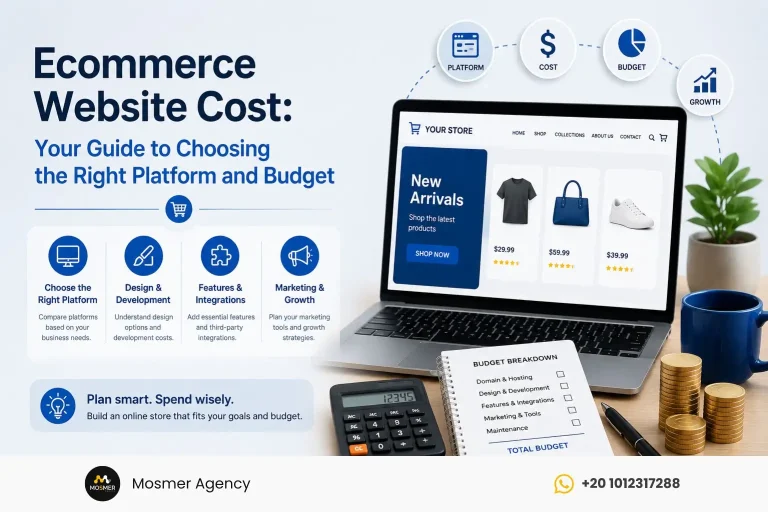
The cost of creating an e-commerce store depends on several factors, including the platform used, store size, design level, number of products, payment and shipping methods, required integrations, as well as marketing and maintenance after launch. A simple store with a limited number of products will not cost the same as a large store that needs advanced features, external system integrations, and a customized user experience.
That is why there is no fixed cost that fits every project. What matters most is setting the right budget based on the store’s goal, the stage of the business, and the type of growth you want to achieve. The right question is not only: how much will the store cost? It is: what kind of store do you actually need to serve your business and generate scalable sales?
Direct Answer Summary
The cost of creating an e-commerce store varies depending on the platform, level of customization, store size, and required add-ons. In general, the cost is divided into an initial setup cost, which includes design, development, and configuration, and a monthly or annual running cost, which includes hosting or subscription fees, apps, maintenance, technical support, and marketing.
If you use WooCommerce, the cost may start at around $175 for simple stores, and may reach $5,000+ for professional stores depending on design and add-ons. For Shopify, the setup cost often ranges between $175 and up to +$5,000 for basic stores, with a monthly subscription depending on the Shopify plan used. As for stores built with Custom Development, they often start from $500 to $25,000+, and can increase significantly depending on complexity and required integrations.
In other words, the real cost does not depend only on building the store. It also depends on the chosen platform, level of customization, add-ons, maintenance, and preparing a marketing budget after launch. A successful store is not necessarily the cheapest one. It is the store that best fits your business needs, budget, and growth plan.
Table of Contents
What Factors Determine the Cost of Creating an E-commerce Store?
The Platform Used
The first factor that affects the cost of creating an e-commerce store is the platform the store will be built on. Choosing the platform does not only determine the store’s appearance. It also affects how the store is managed, the level of flexibility, the size of ongoing costs, and how easy it will be to develop the store in the future.
One of the most popular options is WordPress / WooCommerce, a flexible choice that suits many small and medium-sized stores, especially if the project needs greater control over content, add-ons, and search engine optimization.
Shopify, on the other hand, is suitable for businesses that want to launch an online store quickly with simpler management. It provides hosting, security, selling tools, and payment systems within one platform, but it comes with a monthly subscription cost and apps that may increase expenses over time.
In contrast, Custom Development is the more advanced and expensive option. It is used when a project requires special features, complex integrations, or a user experience that ready-made platforms cannot provide.
The main difference is that ready-made platforms help reduce launch time and cost, while custom development gives you more freedom, but requires a higher budget and a longer implementation timeline.
Store Size and Number of Products
The size of the store and the number of products play a direct role in determining the cost. A small store with a limited number of products and simple pages will not require the same effort or budget as a medium or large store.
A small store usually needs basic product setup, clear pages, simple payment and shipping methods, and a direct purchase journey. A medium-sized store may need more features, such as multiple categories, offers, coupons, optimized product pages, and integration with analytics or marketing tools.
A large store often requires more complex inventory management, many categories, advanced search filters, external system integrations, and possibly different permissions for team members. The larger and more complex the store becomes, the higher the cost of design, development, testing, and maintenance.
Design and User Experience
Design is not just about visual appearance. It is a key factor that affects customer trust and purchasing decisions. That is why the price differs depending on whether the store is built using a ready-made template, a modified design, or a fully custom design.
A ready-made template is the lowest-cost option and is suitable for stores that want a fast launch with a limited budget. However, it may be less distinctive and may not fully reflect the brand identity.
A modified design gives you more flexibility, allowing you to customize colors, fonts, pages, and browsing experience to fit your business. A fully custom design costs more, but it gives you a unique experience built specifically around your audience and the buying journey inside the store.
User experience becomes even more important because it directly affects conversions. A fast, clear, and easy-to-navigate store helps customers reach the product and complete their order, while a complicated or slow design may cause visitors to leave before buying.
Payment and Shipping Methods
Payment and shipping methods clearly affect the cost of creating an e-commerce store, especially if the project needs more than one payment gateway or more than one shipping provider.
Setting up payment gateways requires technical integration, testing, and ensuring that the payment experience is secure and smooth. The more payment options you add, the more settings and integrations may be required.
The same applies to shipping companies. Some stores only need a simple connection with one shipping provider, while others need integrations with multiple providers, automatic shipping cost calculation, order tracking, and customer notifications.
Connecting the store with external systems, such as inventory, invoicing, or order management systems, also increases the cost because it requires accurate development and integrations to ensure data flows correctly between multiple systems.
Add-ons and Integrations
Add-ons and integrations may seem like small details, but they can significantly change the total cost of the store. Every tool added to the store requires setup, testing, and sometimes a monthly or annual subscription.
You may need marketing tools to track visitors, launch campaigns, or improve customer experience. You may also need coupon and discount systems, loyalty programs, abandoned cart recovery tools, or email marketing integrations.
Some stores also need integration with a CRM to manage customers, an ERP to manage inventory and operations, or Email Marketing tools to send offers and automated messages. Analytics tools are also essential for understanding user behavior and measuring store performance.
All these add-ons make the store stronger and more efficient, but they also add to the setup and running costs. That is why they should be chosen based on real business needs, not simply to add more features.
Maintenance and Technical Support
The cost of creating an e-commerce store does not end at launch. The store needs maintenance and technical support to keep running efficiently and securely.
Maintenance includes platform, plugin, and theme updates, along with security monitoring, backups, bug fixes, and speed and performance optimization. These are essential because any technical issue can affect the customer experience or interrupt sales.
The store also needs continuous improvement as the business grows. Later, you may need to add new features, improve product pages, adjust the checkout experience, or develop new sections. That is why technical support should be calculated as part of the budget, not treated as a secondary cost.
The Difference Between Setup Cost and Monthly Running Cost
Setup Cost
The setup cost is the amount you pay at the beginning to create and launch the store. It usually includes store design, development, page setup, product uploads, payment gateway setup, shipping integrations, and testing the purchase experience before launch.
This phase also includes making sure the store works correctly across different devices, that the ordering steps are clear, and that the customer can browse, add products to the cart, pay, and receive order confirmation without issues.
In other words, the setup cost is the cost of building the store and preparing it to start selling.
Monthly Running Cost
The monthly running cost refers to the ongoing expenses the store needs after launch. These include hosting or platform subscription, apps and add-ons, maintenance, technical support, security, backups, and updates.
The running cost also includes the marketing and advertising budget, which is one of the most important items that should not be ignored. The store alone will not generate sales unless it receives targeted traffic from Google, social media, paid ads, or email marketing.
That is why you should treat running costs as an essential part of store success, not as extra expenses that can be ignored.
Why Is the Real Cost Higher Than the Build Cost Alone?
The real cost of an e-commerce store is often higher than the build cost alone because the store is not a project you launch once and then leave untouched. It is a digital asset that needs operation, monitoring, improvement, and continuous marketing.
After launch, you will need to monitor performance, improve speed, update products, analyze customer behavior, fix issues, and improve user experience. As sales grow, you may need additional features or new integrations that help you manage orders and customers more efficiently.
Marketing is also a core part of any successful e-commerce store. Even if the store is beautifully designed, it will not deliver results without a plan to attract visitors and convert them into customers.
So when calculating the cost of creating an e-commerce store, do not look only at the price of design and development. You should also calculate the cost of operation, maintenance, marketing, and continuous improvement. This is the realistic picture of the store’s long-term cost.
Ecommerce Website Cost Using WordPress / WooCommerce
What Is WooCommerce?
WooCommerce is one of the most popular solutions for building e-commerce stores. It is an open-source plugin that works on WordPress. In other words, if you already have a WordPress website, you can turn it into a complete online store using WooCommerce.
WooCommerce is suitable for small and medium-sized stores that need high flexibility and greater control over website details, whether in design, product management, search engine optimization, or adding features as needed.
The main advantage of WooCommerce is that it does not force you into one fixed business model. You can start with a simple store, then gradually develop it with more add-ons and features as the business grows. That makes it a suitable option for business owners who want to control costs and build in stages.
Cost of a Simple WooCommerce Store
The cost of creating a simple e-commerce store using WooCommerce often starts from around $175, depending on the level of setup, the template used, and the hosting selected.
This type of store is suitable for small businesses or brands that want to launch an initial store with a limited number of products and basic features. In most cases, the store is built using a ready-made template, basic WooCommerce setup, and simple payment gateway integration.
The basic cost usually includes:
- Domain name
- Hosting
- Suitable WordPress theme
- WooCommerce setup
- Basic product upload
- Payment gateway setup
- Basic shipping settings
This option is suitable if your goal is to start selling quickly at a reasonable cost, without moving into custom design or complex features from the beginning.
Cost of a Professional WooCommerce Store
If you want a more professional WooCommerce store, the cost often ranges between $500 and up to $5,000+, depending on the design level, number of pages, required add-ons, and technical customizations.
This type of store is suitable for companies that want a stronger store in terms of appearance, performance, user experience, and search engine visibility. Instead of relying completely on a ready-made template, the design may be customized more deeply, or custom interfaces may be built to match the brand identity.
The cost of a professional WooCommerce store may include:
- Custom or modified design
- Paid professional add-ons
- Website speed optimization
- Basic SEO setup
- Product page optimization
- Analytics and marketing tool integration
- Technical support and maintenance
- More advanced payment and shipping settings
The higher the level of customization, the higher the cost. But in return, you get a store that is better prepared to support growth and improve the customer experience.
Advantages of WooCommerce
One of the biggest advantages of WooCommerce is that it gives you high flexibility in managing and developing your store. You can control the design, add-ons, data, and product display method more than you can with many ready-made platforms.
The platform cost itself can also be lower in the long term because WooCommerce is open source and does not require a mandatory monthly subscription like some hosted platforms. However, you will still need to pay for hosting, add-ons, maintenance, and technical support.
WooCommerce is also a strong option for projects that care about content and SEO, because it works inside WordPress, a platform that is highly suitable for building articles, optimized pages, and visibility strategies on Google.
Disadvantages of WooCommerce
Despite its flexibility, WooCommerce requires more technical management than some ready-made platforms. The store owner or responsible team must follow up on updates, security, backups, and any issues that appear on the website.
Maintenance is not fully built into the platform. It depends on hosting, add-ons, and the developer or team managing the store. If many add-ons are used or professional hosting is required, the cost may gradually increase.
For that reason, WooCommerce is not always the “cheapest” option in every case, but it is often a flexible and scalable choice when planned correctly.
Here is the English version of the uploaded section, keeping the same structure and meaning.
Ecommerce Website Cost Using Shopify
What Is Shopify?
Shopify is a hosted e-commerce platform, which means it provides the core infrastructure needed to run your store without requiring you to manage hosting or complex technical aspects yourself.
Shopify includes hosting, an SSL security certificate, payment system, checkout page, and essential commerce tools within one platform. This makes it a suitable option for businesses that want to launch an online store quickly with as little technical complexity as possible.
Shopify is ideal for projects that want to focus on selling, products, and marketing instead of managing servers and technical updates.
Shopify Subscription Cost
Shopify is based on monthly plans, and the cost varies depending on the plan you choose. Plans usually start with Basic, then Grow, then Advanced, up to Shopify Plus, which is designed for larger businesses.
However, it is important to note that the monthly subscription is not the only cost. Other expenses may appear, such as buying a domain, choosing a paid theme, installing additional apps, customizing the design, and payment gateway or transaction fees depending on the payment method used.
So when calculating the cost of creating an e-commerce store on Shopify, you should not look only at the subscription price. You should look at the full cost of setup and operation.
Cost of Setting Up a Shopify Store
The cost of setting up a simple Shopify store often starts from $175, especially if the store uses a ready-made theme and limited customization.
More customized stores, which need stronger design, custom pages, paid apps, or more advanced settings, may cost between $3,000 and $5,000+.
The cost of setting up a Shopify store usually includes:
- Choosing the right theme
- Customizing the design
- Setting up the main pages
- Adding products
- Setting up payment and shipping
- Installing apps
- Testing the purchase process
- Launching the store
The more customization, apps, and features required, the higher the final cost will be.
Advantages of Shopify
The biggest advantage of Shopify is speed of launch. You can create and run a store in less time compared to custom development or some complex WooCommerce projects.
Shopify is also easy to manage, giving business owners a clear dashboard to manage products, orders, customers, and payments. This makes it suitable for companies that do not want to deal with major technical complexity.
Another advantage is that hosting and security are built into the platform, which reduces the daily technical maintenance burden on the store owner.
Disadvantages of Shopify
Despite Shopify’s ease of use, it has some disadvantages that should be included in the cost calculation. The first is the ongoing monthly subscription, meaning platform costs continue after launch.
App costs may also increase over time, especially if you need additional features such as marketing, offers, analytics, subscriptions, or user experience improvements.
Compared with custom development, Shopify remains less flexible in some areas because you are working inside a fixed system. Some advanced features may require higher plans or paid apps, which can increase the monthly cost as the store grows.
Custom Ecommerce Website Cost
When Do You Need Custom Development?
Custom Development is the right option when ready-made platforms are not enough to meet your project’s needs. Not every business needs this option, but it becomes important when the business model is complex or different from traditional online stores.
You may need a custom store if you have a special ordering system, complex pricing, advanced integration with inventory or ERP, a unique user experience, or features that cannot be easily implemented through WooCommerce or Shopify.
Custom development is also suitable if you need a highly scalable platform, or if the store is part of a larger digital system that includes a mobile app, a custom dashboard, or multiple integrations.
Expected Cost of Custom Development
The cost of creating a custom e-commerce store often starts from around $500 to $25,000+, and it can increase significantly for large projects or Enterprise stores.
The cost depends on several factors, including project size, number of required features, design level, type of integrations, development team experience, and implementation timeline.
A relatively simple custom store is completely different from a large e-commerce platform that needs user management, inventory, orders, payments, shipping, permissions, reports, and integration with external systems.
That is why custom development is not priced with one fixed number. It is estimated based on the scope of work and detailed requirements.
What Does Custom Development Cost Include?
The cost of custom development is usually not limited to writing code. It includes multiple stages that start with understanding the project and end with launch and support.
The cost may include:
- Discovery and requirements analysis
- UI/UX Design
- Frontend Development
- Backend Development
- Custom dashboard development
- Payment and shipping gateway integration
- Integrations with external systems
- QA Testing
- Deployment
- Post-launch support
Each of these stages requires time and a specialized team, which is why custom development costs more than ready-made platforms.
Advantages of Custom Development
The biggest advantage of custom development is full control. You can build the store in a way that fits your business model, instead of adjusting your business to fit the limits of a ready-made platform.
Custom development also gives you a user experience designed specifically for your audience, with features built around your actual needs rather than what templates or plugins allow.
It is highly suitable for complex systems, large projects, and stores that need strong scalability over the long term.
Disadvantages of Custom Development
The first disadvantage of custom development is the higher cost. It requires a design, development, testing, and project management team, which makes it a larger investment compared with WooCommerce or Shopify.
Implementation time is also longer, because everything is built according to the project’s requirements rather than from a ready-made template.
In addition, a custom store needs a strong technical team to manage and maintain it, because updates, bug fixes, future development, and security are more complex.
For that reason, custom development is only suitable when the project’s needs justify the cost, not just because you want to build a “different” store.
Here is the English version of the uploaded section, keeping the same structure and meaning.
Ecommerce Website Cost Comparison by Platform
To understand the picture more clearly, you can compare the cost of creating an e-commerce store based on the platform used. This comparison does not provide one fixed final price, but it helps you identify the option that is closest to your budget and business needs.
| Store Type | Estimated Setup Cost | Ongoing Cost Style | Best For |
| WordPress / WooCommerce | $175 to $5,000+ | Hosting, add-ons, maintenance | Businesses that want flexibility and a lower starting cost |
| Shopify | $175 to $5,000+ plus monthly subscription | Monthly subscription, apps, payment fees | Fast launch and easy management |
| Custom Development | $500 to $25,000+ | Maintenance, support, continuous development | Complex or large projects |
This comparison shows that choosing a platform should not depend on price alone, but on the nature of the project. If you want a flexible start with a lower budget, WooCommerce may be suitable. If you want a faster launch and easier management, Shopify may be a practical option. But if your project needs custom features and complex integrations, custom development is the better fit despite its higher cost.
What Are the Monthly Costs of Running an E-commerce Store?
Hosting or Platform Subscription
The first monthly or annual cost to calculate is hosting or platform subscription. If your store is built on WooCommerce, you will need suitable hosting that can handle your store traffic, number of products, and order volume.
If you use Shopify, the cost is clearer from the beginning because it depends on a monthly platform subscription. However, the cost may increase if you choose a higher plan or add paid apps.
Domain and Business Email
The domain is your store’s online address, and it is usually renewed annually. Its cost may not be high compared with other expenses, but it is an essential item that should not be ignored.
Most businesses also need a professional email address connected to the domain, such as an email for customer service, sales, or technical support. A professional email helps build trust and makes communication with customers more formal and clear.
Add-ons and Apps
Over time, you may need add-ons or apps to improve your store’s performance. These tools may include marketing apps, discount tools, analytics tools, payment and shipping add-ons, or abandoned cart recovery tools.
In WooCommerce, this cost often appears in the form of paid add-ons or annual licenses. In Shopify, it may appear as monthly apps paid in addition to the platform subscription.
Although these add-ons may seem simple at first, their accumulation can clearly increase the monthly running cost. That is why they should be chosen based on real need.
Maintenance and Security
Maintenance and security are among the most important ongoing costs for any e-commerce store. The store needs regular updates, security monitoring, backups, and continuous performance optimization.
In WooCommerce, maintenance is especially important because the website depends on WordPress, the theme, and plugins, all of which need ongoing monitoring to prevent technical issues or security vulnerabilities.
In Shopify, a large part of hosting and security is built into the platform, but you still need to monitor apps, store settings, and user experience.
Marketing and Advertising
Creating the store does not mean customers will automatically find it. That is why marketing and advertising costs must be calculated as an essential part of the operating budget.
These costs may include SEO, Google Ads, social media ads, content marketing, and email marketing. Each of these channels helps attract visitors and convert them into customers.
Ignoring the marketing budget after launch is one of the most common mistakes, because a store without targeted traffic will not generate sales even if it is professionally designed.
Technical Support and Continuous Improvement
Once the store is running, new needs will appear: fixing issues, improving user experience, developing new features, or adjusting pages based on customer behavior.
Technical support helps keep the store stable, while continuous improvement helps increase conversion rates and improve the shopping experience. That is why it is better to treat the store as a digital asset that needs ongoing development, not as a project that ends after launch.
Which Platform Is Best Based on Your Budget?
If Your Budget Is Limited
If your budget is limited and you want to launch an e-commerce store with a lower starting cost, WooCommerce may be a flexible and suitable option. It gives you good control over the website and allows you to start with basic settings, then develop the store gradually.
This option is suitable for businesses that want to reduce initial costs, especially if the store is small or medium-sized and does not need complex features from the beginning.
If You Want a Fast Launch
If your goal is to launch the store quickly with easier management, Shopify may be a suitable option. It provides hosting, security, payment systems, and product management inside one platform, reducing technical complexity.
Its monthly cost is also clearer because you know the basic subscription price from the beginning. However, you should pay attention to the cost of apps and additional customizations.
If You Have a Large Project or Special Requirements
If you have a large project, a complex business model, or a special requirement that cannot be easily implemented on a ready-made platform, Custom Development may be the most suitable choice.
This option is suitable when you need special integrations, complex features, a custom user experience, or a highly scalable platform. Although it costs more, it gives you full control over how the store is built and operated.
Practical Recommendation
In practical terms, the decision can be simplified as follows:
WooCommerce is suitable if you want flexibility and a lower starting cost.
Shopify is suitable if you want speed and ease in launch and management.
Custom Development is suitable if you need full control and custom features.
The most important thing is not to choose the platform based on price alone, but based on your project needs, budget, and the growth plan you want to achieve.
Here is the English version of the uploaded section, keeping the same structure and meaning.
Mistakes That Increase the Cost of Creating an E-commerce Store
The cost of creating an e-commerce store does not always increase because of project size alone. Sometimes, it increases because of wrong decisions made at the beginning. Poor choices or lack of planning can make the store more expensive than expected, both during development and after launch.
The first mistake is starting without a clear plan. When the store’s goals are not defined from the beginning, it becomes easy to add unnecessary features, change the design more than once, or choose a platform that does not fit the nature of the project. This leads to more time and higher costs.
The second mistake is choosing the wrong platform. Some projects start with custom development even though they do not need it, while others choose a simple platform that cannot support expected growth. That is why platform selection should depend on project size, budget, number of products, and the type of required features.
Using too many add-ons without a real need can also increase the cost and affect store performance. Some add-ons are paid, some require setup and maintenance, and others may slow down the website if they are not selected carefully.
Another important mistake is ignoring user experience. A cheap design may seem like a budget-friendly option at first, but it can lead to weak conversions, a higher bounce rate, and difficulty completing purchases. In this case, the loss becomes greater than the initial saving.
Not calculating maintenance costs from the beginning is also a common mistake. The store needs updates, security, backups, technical support, and continuous improvement. If these costs are not included in the budget, they may appear later as unexpected expenses.
Relying on a cheap design that cannot scale may also cause problems as the store grows. You may later need to rebuild large parts of the website instead of developing it gradually, which increases the cost instead of reducing it.
Ignoring SEO from the beginning is also a costly mistake. If the store is not built with a proper URL structure, optimized product pages, and good loading speed, you may later need major changes to improve visibility on Google.
Finally, not preparing a marketing budget after launch leaves the store technically ready, but without traffic or sales. An e-commerce store does not succeed just because it exists. It needs a marketing plan that attracts customers and encourages them to buy.
How to Reduce the Cost of Creating an E-commerce Store Without Sacrificing Quality
Reducing the cost of creating an e-commerce store does not mean choosing the cheapest solution. It means making smart decisions that help you launch a strong and scalable store without unnecessary spending. The goal is to start with what you actually need, then improve the store as the business grows.
Start With the Essential Features Only
Do not start with every feature at once. Many business owners ask for advanced features from the beginning, such as loyalty programs, complex filters, multiple integrations, or custom systems, before confirming whether the market actually needs them.
It is better to launch a first version that is scalable and includes the essentials: product display, a clear shopping cart, payment gateways, shipping settings, and key pages such as About Us, return policy, and contact information.
This way, you can test the market, understand customer behavior, and then add the most important features based on real data, not assumptions.
Choose the Platform Based on Your Needs
Choosing the right platform from the beginning can save you many costs later. Do not choose Custom Development if you do not need complex features or special integrations, because the cost will be higher than necessary.
At the same time, do not choose Shopify only because it is easy if the required apps will significantly increase the monthly cost. Also, do not choose WooCommerce without a clear maintenance plan, because it requires continuous technical follow-up.
The right choice is the one that balances budget, ease of management, scalability, and the nature of the project. Every platform has its advantages, but the best option is the one that fits your actual needs.
Use a Professional Customizable Template
Using a professional customizable template can significantly reduce cost, especially at the beginning of the project. It saves design and development time and helps launch the store faster.
However, the important point is not to choose any template just because it is cheap. The template should be fast, mobile-friendly, customizable, and support a clear shopping experience. A good template gives you a professional appearance without needing a fully custom design from the start.
This way, you maintain design quality while reducing launch costs at the same time.
Focus on SEO From the Beginning
Paying attention to search engine optimization from the beginning saves you the cost of fixing problems later. The store should be built with a proper URL structure, optimized product pages, good loading speed, and clear content that helps both users and search engines understand the products.
SEO is not just about writing keywords. It includes site structure, headings, product descriptions, images, internal links, and user experience. The earlier these elements are implemented, the more ready the store becomes to attract organic traffic over time.
Plan for Marketing Before Launch
A common mistake is spending most of the budget on building the store, then having nothing left for marketing. That is why the marketing budget should be part of the plan from the beginning.
Before launch, you should define how customers will reach the store: through Google, paid ads, social media, content, or email?
Planning marketing before launch ensures that the store is not only technically ready, but also ready to attract traffic and generate sales.
How Can Mosmer Agency Help You Create an E-commerce Store That Fits Your Budget?
Choosing the cost of creating an e-commerce store should not be random or based only on the cheapest offer. What matters most is choosing a solution that fits your budget, business type, product volume, project stage, and growth goals.
At Mosmer Agency, we help you identify the most suitable solution for your e-commerce store based on your actual needs, not a ready-made model that claims to fit everyone. The right option for you may be a simple scalable store, a flexible WooCommerce store, Shopify for a faster launch, or custom development if your project requires advanced features.
Mosmer Agency’s services include Web Design & Development, E-commerce Solutions, WooCommerce store development, Shopify setup and customization, Custom Development, as well as post-launch marketing services such as SEO, paid ads, Google Ads, and social media management.
Our goal is not just to build a store that looks good. We focus on creating a store that is scalable, clear in user experience, optimized for search engines, and capable of supporting sales as your project grows.
If you want to know the best option for your budget before you start, you can contact Mosmer Agency to help you build an e-commerce store that serves your current goals and gives you real room for future growth.
Frequently Asked Questions About Ecommerce Website Cost
How much does it cost to create an e-commerce store?
The cost of creating an e-commerce store varies depending on the platform, store size, design level, and number of required features. In general, simple stores can start from a few hundred dollars, especially when using WooCommerce or a ready-made template. More professional or custom-built stores can cost thousands or even tens of thousands of dollars.
Is WooCommerce cheaper than Shopify?
WooCommerce can be cheaper in terms of the platform itself because it is open source and does not require a mandatory monthly subscription. However, it still requires hosting, a domain, add-ons, maintenance, and ongoing updates. Shopify, on the other hand, has a clear monthly subscription, but it may include additional costs such as apps, paid themes, and payment fees. So the cheaper option depends on the store’s needs and how it will be operated.
How much does a Shopify store cost?
The cost of a Shopify store is not limited to the monthly subscription. You also need to calculate setup cost, theme selection, design customization, product upload, app installation, payment and shipping setup, and payment gateway fees. In general, a simple Shopify store may start from around $175, while more customized stores may reach $3,000 to $5,000+.
When do I need a custom-developed e-commerce store?
You need a custom-developed store when ready-made platforms like WooCommerce or Shopify are not enough to cover your project’s needs. This may happen if you have a complex business model, special features, integrations with external systems, a unique user experience, or the need for a highly scalable platform. In this case, custom development is the better option, even though it costs more.
What are the monthly costs of an e-commerce store?
The monthly costs of an e-commerce store include hosting or platform subscription, apps and add-ons, maintenance, technical support, security, backups, marketing, and advertising. These costs may vary depending on the platform used, the size of the store, and the number of tools needed to operate it efficiently.
Does the cost of creating an e-commerce store include marketing?
Usually, no. The cost of creating an e-commerce store typically includes design, development, setup, payment, shipping, and testing. Marketing is a separate cost that needs its own budget to attract traffic and generate sales, such as SEO, Google Ads, social media ads, content marketing, and email marketing.
Conclusion
The cost of creating an e-commerce store is not one fixed number. It varies depending on the platform used, design level, development scope, required integrations, and the maintenance plan after launch.
If you are looking for flexibility and a lower starting cost, WooCommerce may be a suitable option, especially for small and medium-sized stores that want more control over the website, content, and gradual scaling. If you want a faster launch and easier management without major technical complexity, Shopify may be a practical choice because of its monthly subscription and ready-made platform.
Custom Development is best suited for large or complex projects that need special features, advanced integrations, or a fully customized user experience. Although it is the most expensive option, it gives you greater control when ready-made platforms are not enough.
The most important thing is to calculate setup and running costs together. A store does not only need to be built; it also needs maintenance, security, continuous improvement, and marketing to attract customers. That is why the successful store is not the cheapest one, but the one that best fits your project stage, budget, and growth goals.